To set up cloaking, you will need:
- Ad accounts (or any other traffic source)
- A VPS server or shared hosting with PHP and php-curl installed
- Domains for both the white page and the black page
- White page — a clean, compliant webpage matching your ad content. Bots and moderators land on it to scan the code, text, media, links, and tracking scripts.
- Black page — a landing page promoting content restricted by advertising networks. It is hidden from bots and moderators and shown only to your target audience. It can belong to an affiliate network or be your own product page.
How it works:
- Upload the white page to your hosting.
- Create and configure a flow in hoax.tech, specifying your black page URL.
- Download the integration file from the flow and upload it to the white page directory.
- Add the white page URL to your ad campaign (or other traffic source) and start sending traffic.
Result:
Bots and moderators stay on the white page, while real users are automatically redirected to the black page.
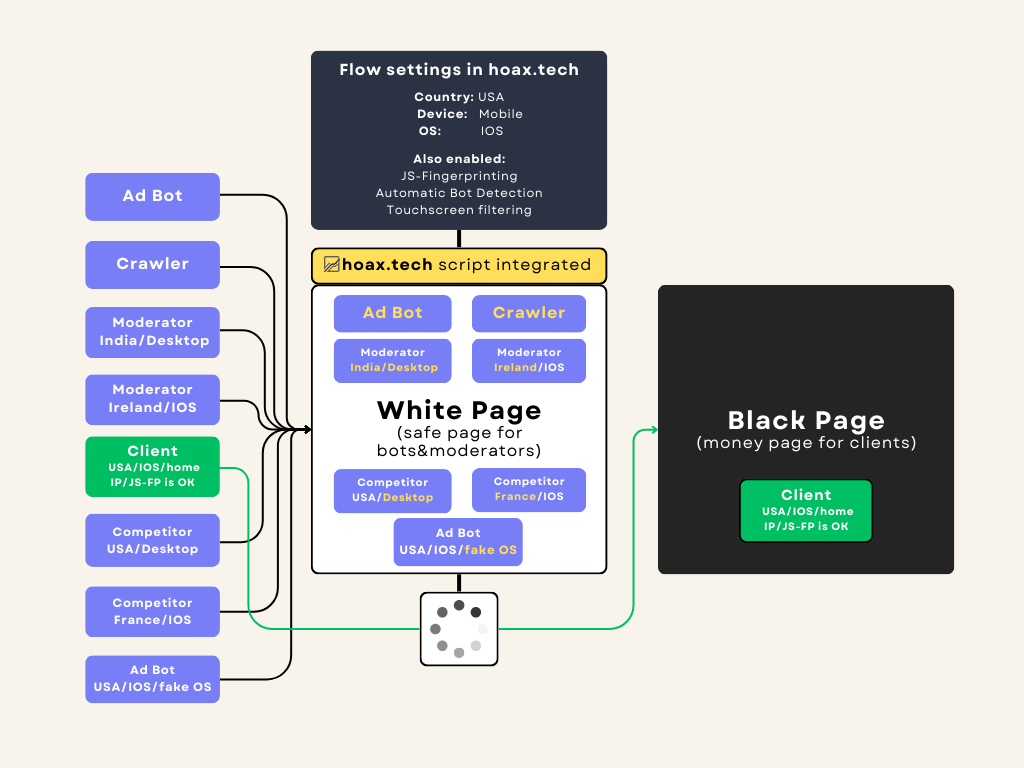
The white page can also be created on website builders or platforms without PHP support — such as Wix, Tilda, Blogger, GitHub, and others. In this case, cloaking is installed using the JavaScript integration.
Our test white page is available at this domain.
It is accessible from IPv4/IPv6 proxies, VPN, Tor, and other corporate or datacenter IP ranges.
Redirection to the black page works when visiting from a regular browser, residential proxies, or a home IP address.
You can find guidelines for creating and designing a white page in this section.