根据流设置定义为目标访客且应被重定向到 black页面的访客,在 white页面上将为其设置一个带有流哈希值的 cookie。
在 hoax.tech 中实现了多种 black页面操作类型。
Set Cookie 操作类型并不用于自动重定向到 black页面,而是为目标访客设置 cookie,以便稍后分配相应操作,例如点击按钮、访问特定页面、下载文件等。
以下是使用 Set Cookie 操作类型在访客点击按钮时重定向到 black页面的示例。
创建一个流。
在集成参数中,将操作类型设置为 Set Cookie。
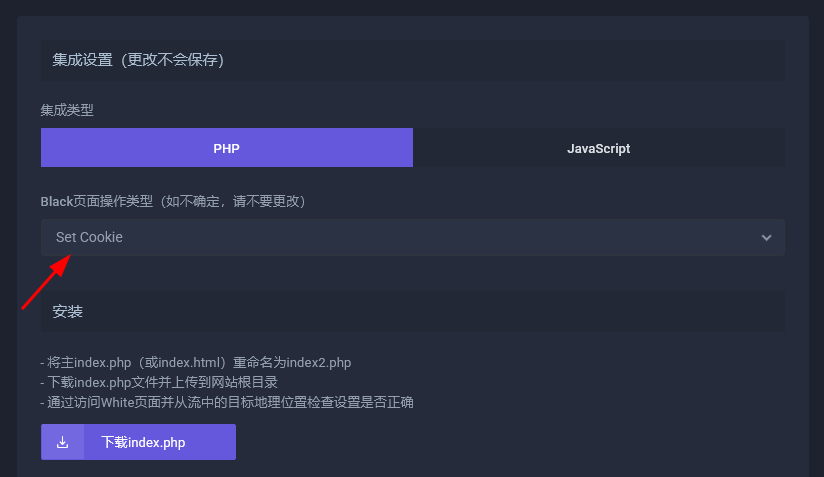
在 white页面 上集成脚本 (https://setcookie.hoax.tech)。
当流量导向 white页面 后,机器人和目标访客都会停留在 white页面,但目标访客会收到包含流哈希值的 cookie。
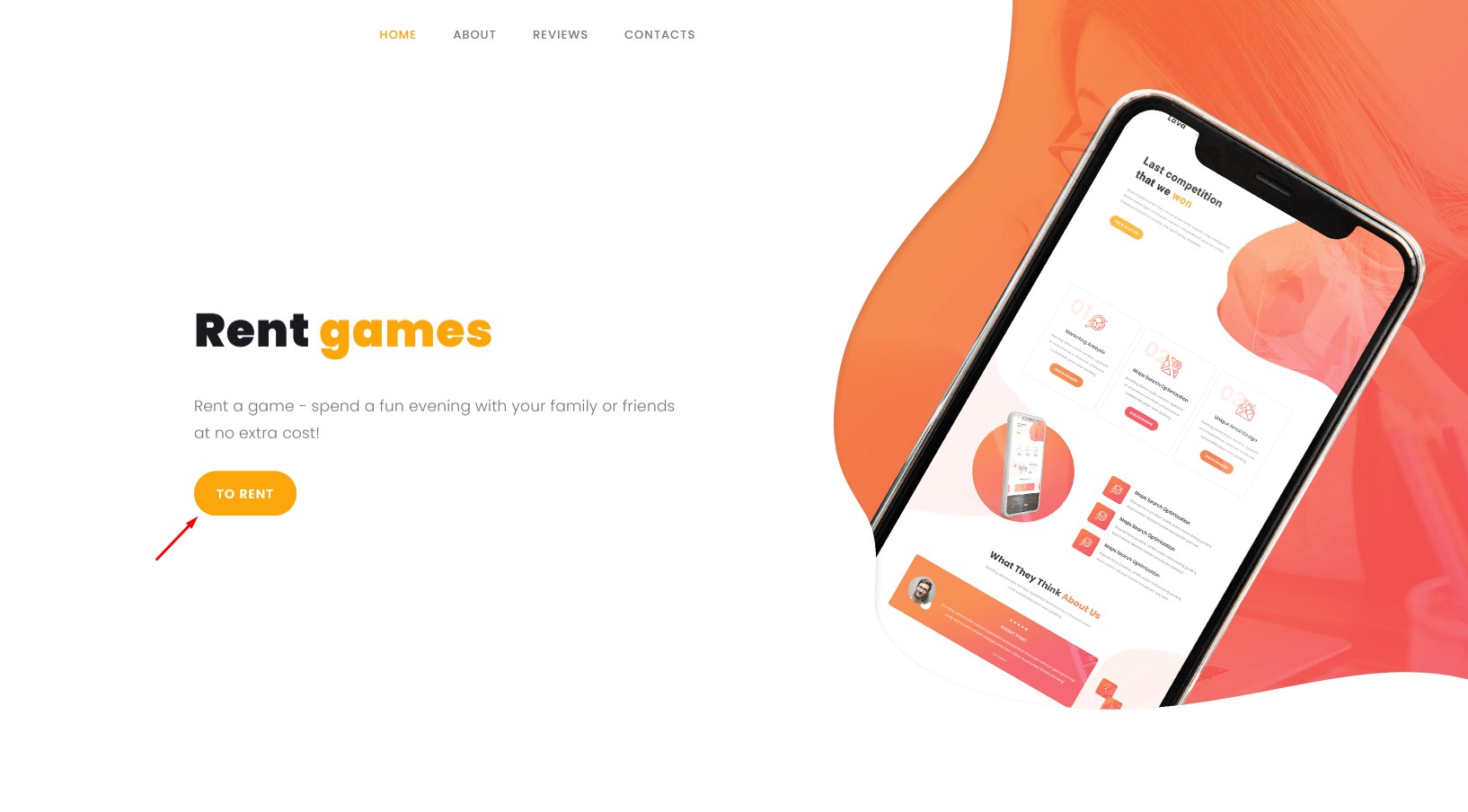
接下来的脚本将集成到 white页面 上的“租用”按钮中,用于检查点击该按钮的访客的 cookie。对于目标访客,将重定向到 black页面(在本例中为 https://black.hoax.tech),而对于机器人、审核员及其他访客,将重定向到备用安全页面(在本例中为 https://setcookie.hoax.tech/contact-us )
<script>
document.querySelector("#BUTTON").addEventListener("click", function(event) {
event.preventDefault();
    function getCookie(name) {
        const matches = document.cookie.match(new RegExp(
            "(?:^|; )" + name.replace(/([.$?*|{}()[]\/+^])/g, '\\$1') + "=([^;]*)"
        ));
        return matches ? decodeURIComponent(matches[1]) : null;
    }
    if (getCookie("FLOW_HASH")) {
        window.location.href = atob("BASE64_BLACK_PAGE");
    } else {
       window.location.href = atob("BASE64_WHITE_PAGE");
    }
});
</script>
变量说明:
BUTTON — 触发事件的按钮 ID。
FLOW_HASH — 流的 hash,可在 https://hoax.tech/flows 获取。
BASE64_BLACK_PAGE — black页面 的 base64 示例。
BASE64_WHITE_PAGE — white页面 的 base64 示例。
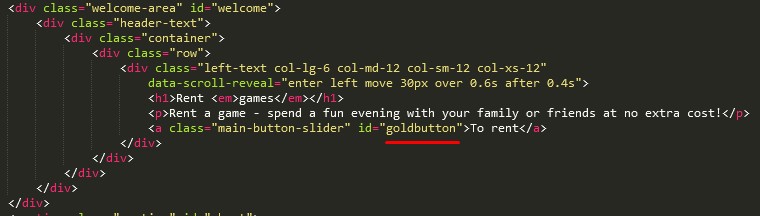
找到 white页面 代码中按钮的 ID 并复制它。如果没有 ID,请为按钮分配一个,例如 "goldbutton"。
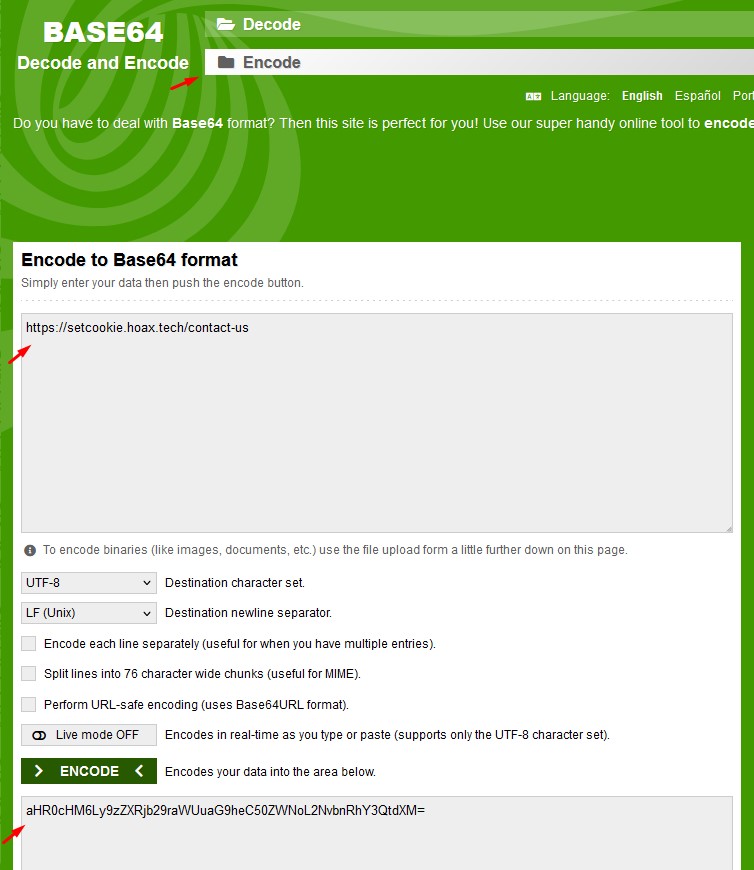
为了增强安全性,请使用如 base64decode.org 之类的服务将 white 页面和 black 页面 的链接进行 base64 编码。
将所有变量添加到代码中,代码将如下所示:
<script>
document.querySelector("#goldbutton").addEventListener("click", function(event) {
event.preventDefault();
    function getCookie(name) {
        const matches = document.cookie.match(new RegExp(
            "(?:^|; )" + name.replace(/([.$?*|{}()[]\/+^])/g, '\\$1') + "=([^;]*)"
        ));
        return matches ? decodeURIComponent(matches[1]) : null;
    }
    if (getCookie("4126123ffb74b745e81c70f3bfb686df")) {
        window.location.href = atob("aHR0cHM6Ly9ibGFjay5ob2F4LnRlY2g=");
    } else {
       window.location.href = atob("aHR0cHM6Ly9zZXRjb29raWUuaG9heC50ZWNoL2NvbnRhY3QtdXM=");
    }
});
</script>
将生成的脚本插入到 white页面 的 index 文件(index2.php)底部的 <script></script> 标签之间。
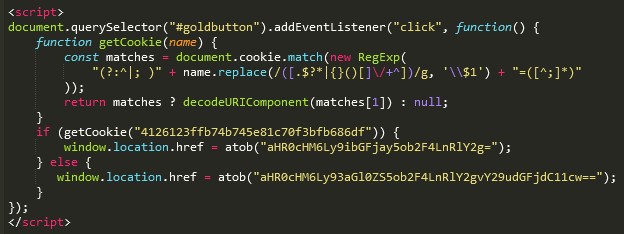
然后保存该文件。
您还可以对 JS 脚本进行混淆,以防广告网络的爬虫识别其用途。您可以使用此服务:https://obfuscator.io/
结果:
<script>
function _0x44c4(){const _0xe4c0fc=['403347WWuKVP','8fEDpfp','27072aUCRWv','aHR0cHM6Ly9ibGFjay5ob2F4LnRlY2g=','addEventListener','9391824hodZYU','3726506YANKlF','4126123ffb74b745e81c70f3bfb686df','aHR0cHM6Ly9zZXRjb29raWUuaG9heC50ZWNoL2NvbnRhY3QtdXM=','768945BCWBCp','#goldbutton','1460530wQGfLy','8pIPjbO','href','click','(?:^|;\x20)','3695868Lymavf','location','replace','querySelector'];_0x44c4=function(){return _0xe4c0fc;};return _0x44c4();}function _0x21a8(_0x3ae868,_0x451a7c){const _0x44c499=_0x44c4();return _0x21a8=function(_0x21a859,_0xadcba8){_0x21a859=_0x21a859-0x18e;let _0x236e1f=_0x44c499[_0x21a859];return _0x236e1f;},_0x21a8(_0x3ae868,_0x451a7c);}const _0xed30a5=_0x21a8;(function(_0x37da8d,_0x52157d){const _0x4c2e78=_0x21a8,_0x43e449=_0x37da8d();while(!![]){try{const _0xda49f9=-parseInt(_0x4c2e78(0x19b))/0x1+parseInt(_0x4c2e78(0x19d))/0x2+parseInt(_0x4c2e78(0x190))/0x3*(parseInt(_0x4c2e78(0x193))/0x4)+parseInt(_0x4c2e78(0x192))/0x5+-parseInt(_0x4c2e78(0x197))/0x6+parseInt(_0x4c2e78(0x1a1))/0x7*(-parseInt(_0x4c2e78(0x19c))/0x8)+parseInt(_0x4c2e78(0x1a0))/0x9;if(_0xda49f9===_0x52157d)break;else _0x43e449['push'](_0x43e449['shift']());}catch(_0x107c00){_0x43e449['push'](_0x43e449['shift']());}}}(_0x44c4,0x4bb6d),document[_0xed30a5(0x19a)](_0xed30a5(0x191))[_0xed30a5(0x19f)](_0xed30a5(0x195),function(){const _0x8a7688=_0xed30a5;function _0x4d91d4(_0x1cc909){const _0x113a72=_0x21a8,_0x31c119=document['cookie']['match'](new RegExp(_0x113a72(0x196)+_0x1cc909[_0x113a72(0x199)](/([.$?*|{}()[]\/+^])/g,'\x5c$1')+'=([^;]*)'));return _0x31c119?decodeURIComponent(_0x31c119[0x1]):null;}_0x4d91d4(_0x8a7688(0x18e))?window[_0x8a7688(0x198)][_0x8a7688(0x194)]=atob(_0x8a7688(0x19e)):window[_0x8a7688(0x198)][_0x8a7688(0x194)]=atob(_0x8a7688(0x18f));}));
</script>
 设置完成。
设置完成。
以下是一个示例脚本,目标访客将被重定向到 black页面,而对于爬虫和审核人员,按钮将无法使用。在这种情况下,不需要第二个 white页面。
<script>
document.querySelector("#BUTTON").addEventListener("click", function(event) {
event.preventDefault();
    function getCookie(name) {
        const matches = document.cookie.match(new RegExp(
            "(?:^|; )" + name.replace(/([.$?*|{}()[]\/+^])/g, '\\$1') + "=([^;]*)"
        ));
        return matches ? decodeURIComponent(matches[1]) : null;
    }
    if (getCookie("FLOW_HASH")) {
        window.location.href = atob("BASE64_BLACK_PAGE");
    }
});
</script>
¶ Cookie 同意提示弹窗
下面提供一个现成的解决方案 —— Cookie 同意提示弹窗,这是用户与网站交互最常见的方式之一。
在点击任意按钮后,目标用户将被重定向到 black页面:

对于机器人或审核人员,弹窗将直接关闭:

¶ 使用 SetCookie 操作类型在 white页面 添加弹窗并集成隐藏功能
- 创建一个流并选择 SetCookie 操作类型
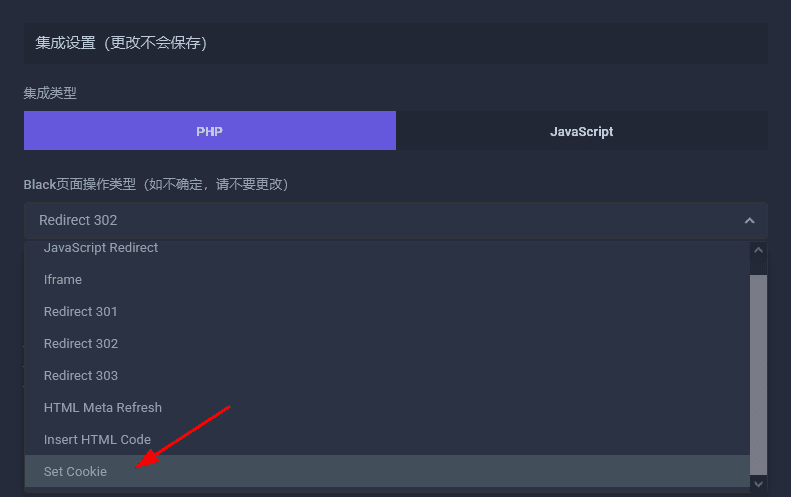
-
使用经典的 PHP 集成方式集成隐藏:从流中下载集成文件 index.php,将 white页面 的入口 index 文件重命名为 index2.php,并将下载的 index.php 上传到你的 white页面 目录中。
-
下载弹窗模板并将其放置到 white页面。
下载 Cookie 同意弹窗模板 -
在 white页面 的
<body>标签后立即添加以下弹窗集成代码:
 <div id="cookieConsentBackdrop" class="cookieConsentBackdrop" aria-hidden="true" style="display: none;"></div>
  <div id="cookieConsentPopup" class="cookieConsentPopup" data-hash="FLOW_HASH" data-key="BLACK_PAGE_BASE64_URL" role="dialog" aria-labelledby="cookieConsentHeading" aria-describedby="cookieConsentDescription" style="display: none;">
  <p id="cookieConsentHeading" class="sr-only">Cookie Consent Popup</p>
  <div id="cookieConsentDescription">
  <p>
  我们重视您的隐私。
  </p>
  <p>
  我们使用 Cookie 来提升您的浏览体验并分析网站流量。点击 "Accept All" 即表示您同意我们使用 Cookie。
  </p>
  </div>
  <div class="cookieConsentPopup-actions">
  <button id="rejectBtn" class="cookieConsentPopup-btn cookieConsentPopup-btn--reject">Reject</button>
  <button id="acceptBtn" class="cookieConsentPopup-btn cookieConsentPopup-btn--accept">Accept</button>
  </div>
  </div>
  <script src="/script.js"></script>
代码中必须指定以下参数:
-
FLOW_HASH - 集成在 white页面 上的流的哈希,可以在 Flows 部分 (https://hoax.tech/flows) 中复制,或在编辑流时从地址栏获取。
-
BLACK_PAGE_BASE64_URL - black页面 的 Base64 格式链接。
要将 black页面 链接编码为 Base64,可以使用 base64decode.org 服务。
-
指定弹窗模板
script.js的正确路径。如果你将其放在网站根目录中,则无需修改路径。 -
如有需要,可以更改弹窗和按钮文本。
-
在将代码添加到 white页面 后,请使用标准方法 检查配置是否正确。
使用此操作类型时,防机器人能力更强,但可能会带来更高的流量损失。不过,未点击任何按钮的用户通常是对你的产品或服务最不感兴趣的受众。